
Getting started
Usage
You can use kaizen-ui so easy. Load the CSS file from your HTML file. That's all!
Stable (release tagged)
Replace ${TAG} with the latest tag number.
If the version is v0.1.0, the CSS file's URL is https://cdn.kaizenplatform.net/releases/v0.1.0/styles/kaizen.css.
To confirm the number, visit here and check the latest released version.
<link rel="stylesheet" href="https://cdn.kaizenplatform.net/releases/${TAG}/styles/kaizen.css">
Latest (master)
Use this version if you want to try the latest kaizen-ui (it means the actively-developed master branch on Github, not yet considered stable).
<link rel="stylesheet" href="https://d1vjvlksozwnuz.cloudfront.net/heads/master/styles/kaizen.css">
What's included
kaizen-ui provides:
- kaizen.css
- Icon files (KaizenIcons)
- Web font files (Montserrat)
- kaizen-ui-colors.scss (See here for more information)
- Styleguide (this document)
The icon font file and web font files are loaded by kaizen.css.
Troubleshooting
Icons are not be displayed correctly. (Small boxes(□) are shown to represent the characters.)
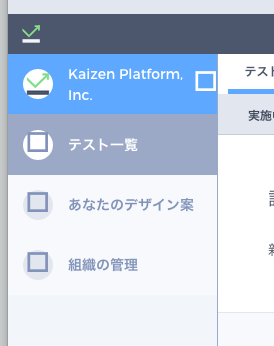
- kaizen-ui is hosted from Amazon S3 and able to access only from permitted domains. If your domain is not permitted, icon fonts and web fonts are not loaded and icons will be shown as small boxes(□).
- To resolve this issue, you have to update S3 settings with CORS Configuration Editor on AWS management console. Please ask in #infra-yorozu channel on Slack.